Simple Duel Game Project
Developers: Marielle Basanes, Julian Onate, Mohammad Rafi Saiyari, Beau Lawyjet Sison
Completion Date: December, 2024
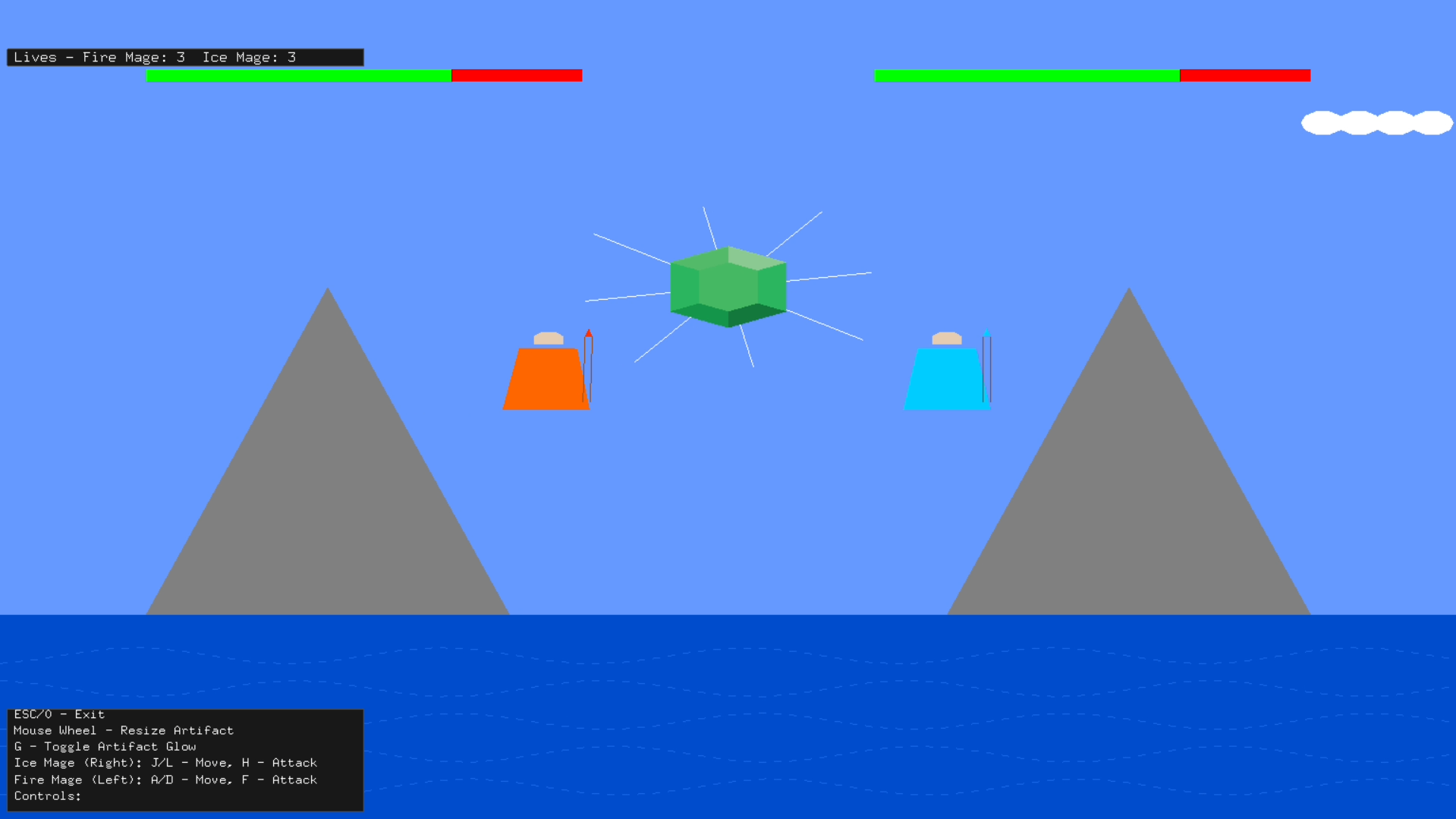
The scene depicts two mage characters, the fire mage and the ice mage, engaged in a battle for a magical artifact located at the center of a mountainous landscape. The environment features mountains, a sea, and a clear sky with clouds, providing a visually appealing backdrop for the action. Each mage has a health bar that visibly decreases whenever they are hit and pushes them backward to demonstrate the impact of their spells. Users can control the fire and ice mage characters using a specific button to cast spells during the battle. The magical artifact at the center can change size using the middle scroll wheel and has glowing rays rotating behind it. This artifact serves as the focal point of the fight as both characters strive to claim it for themselves.
Project Objectives
- To create a 2-player local dueling game using C++ and OpenGL.
- To demonstrate proficiency in 2D graphics rendering using OpenGL primitives.
- To implement fundamental computer graphics transformations (glTranslate, glScale, glRotate) to animate scene objects.
- To manage a real-time game state, including player health, attack animations, collision detection, and a game-over condition.
- To handle simultaneous user input for two players via the keyboard and additional input via the mouse.
- To create a dynamic 2D scene with animated elements, including projectiles, background elements, and character feedback.
Technologies Used
- Core Technologies:
- Language: C++
- Graphics API: OpenGL (utilizing immediate mode `glBegin`/`glEnd`)
- Windowing & Context: GLUT (freeglut)
- OpenGL Extension Loading: GLEW (The OpenGL Extension Wrangler Library)
- Development Environment:
- IDE: Dev-C++
- Compiler: g++ (MinGW)
Game Scene & Objects
The game scene is composed of five primary object categories:
- Characters: The Fire Mage (Player 1) and the Ice Mage (Player 2).
- Environment: A static backdrop featuring mountains, a sea, and a sky.
- Dynamic Elements: Animated clouds moving in the background and attack projectiles (beams) fired by the mages.
- Central Object: A magical artifact that serves as the scene's focal point.
- UI Elements: Player health bars (for Fire Mage and Ice Mage) and a text-based "Game Over" screen that declares the winner.
Key Features
- Two-Player Local Combat: Allows two players to compete against each other on the same keyboard.
- Health System: Both mages have a health bar that visually depletes from 100 to 0.
- Attack Animation: Players can launch a "beam" projectile that travels across the screen.
- Collision Detection: The game logic checks if a projectile has reached the opponent's position, triggering a health reduction.
- Game Over State: When a player's health reaches zero, the game stops, and a "Game Over" message displays the winner.
- Reset Functionality: Players can reset the game at any time to start a new match.
- Dynamic Environment: Includes simple background animations (moving clouds) and a central "artifact" that can be resized.
- Fullscreen Mode: Players can toggle between windowed and fullscreen mode.
OpenGL Implementation & Functionality
This project utilizes core OpenGL fixed-function pipeline features to achieve its visuals and animations.
OpenGL Transformations Implemented
There are five objects: the two mages, the magical artifact, the glowing rays, and the clouds. Each object utilizes different transformations:
- glTranslate: Controls the movement of the mages as they are pushed back when hit. It also animates their hands during spell casting and the horizontal movement of the clouds in the background.
- glScale: Changes the size of the magical artifact, allowing it to grow or shrink based on mouse wheel input.
- glRotate: Animates the glowing rays around the artifact, creating a continuous rotating visual effect.
Controls
The game is controlled via the keyboard and mouse.
Keyboard Controls
| Key | Action |
|---|---|
| `a` | Player 1 (Fire Mage) - Attack |
| `l` | Player 2 (Ice Mage) - Attack |
| `r` | Reset Game - Resets health and positions for a new game. |
| `f` | Toggle Fullscreen - Switches between fullscreen and windowed mode. |
| `ESC` | Exit Game - Closes the application. |
Mouse Controls
| Input | Action |
|---|---|
| Mouse Wheel Up | Increase the size of the central artifact. |
| Mouse Wheel Down | Decrease the size of the central artifact. |
Future Enhancements
While the core functionality is complete, future enhancements could include:
- Implementation of sound effects for spells, impacts, and a "Game Over" sound.
- Addition of a main menu screen and a pause functionality.
- Player-controlled character movement (forward/backward) to add a layer of strategy.
- Refactoring the immediate mode OpenGL (`glBegin`/`glEnd`) to use modern buffer-based rendering (VBOs/VAOs) for improved performance.
Conclusion
This project successfully implements the core requirements of a simple 2D game using C++ and OpenGL. It demonstrates a practical understanding of 2D graphics principles, including shape rendering, transformations, color, user input handling (keyboard and mouse), and state-based animation and game logic.
The game effectively creates an engaging duel scenario with clear visual feedback for player actions, health, and game status, fulfilling all objectives set for the Computer Graphics final project.